Search

Applied Biosystems™
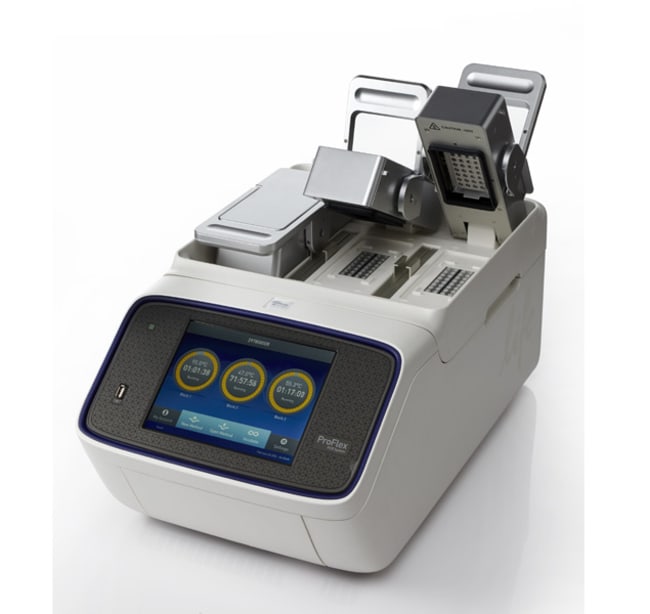
Sistema de PCR ProFlex™, 3 x 32 pocillos
El sistema de PCR ProFlex™ de 3 x 32 pocillos es el último de nuestra línea de termocicladores Applied Biosystems™.Más información
Have Questions?
Cambiar vista

| Número de catálogo | Garantía |
|---|---|
| 4484073 | Garantía limitada |
| A30754 | 3 years of total service coverage |
Número de catálogo 4484073
Precio (MXN)
-
Garantía:
Garantía limitada
El sistema de PCR ProFlex™ de 3 x 32 pocillos es el último de nuestra línea de termocicladores Applied Biosystems™. El sistema ProFlex™ combina la fiabilidad y el rendimiento esperado de los instrumentos Applied Biosystems™ con una configuración flexible y características de control que se adaptan a sus necesidades de investigación.
Solicitar una demostración.
El sistema de PCR ProFlex™ de 3 x 32 pocillos le permite:
• Procesar tres experimentos a la vez con el bloque de 3 x 32 pocillos y 0,2 ml
• Intercambiar el bloque de 3 × 32 pocillos por otro tipo de bloque si cambian sus necesidades de procesamiento
• Acceder al sistema de forma remota (y cómoda) mediante una aplicación móvil
• Programar el instrumento en cuestión de segundos con una interfaz táctil fácil de usar
• Simular su antiguo instrumento con los modos de simulación térmica
• Optimizar su PCR de forma rápida y eficaz con los bloques VeriFlex™ que son mejores que los de gradiente
Control independiente
Comparta su instrumento con otras 2 personas o procese 3 experimentos a la vez con 3 módulos de 32 pocillos controlados de forma independiente.
Bloques intercambiables
Si en el futuro cambian los requisitos de su investigación o si comparte el sistema con una persona que utiliza un formato diferente, basta con extraer el bloque de 3 x 32 pocillos de la parte superior del instrumento e intercambiarlo por otro tipo de bloque. Este paso se realiza en menos de 15 segundos y no requiere herramientas ni kits.
Conectividad con la aplicación para móviles
¿Alguna vez ha configurado todas sus reacciones de PCR y luego se ha dado cuenta de que el termociclador ya está en uso? Compruebe su disponibilidad con una aplicación móvil antes de llegar al laboratorio. Además, descargue archivos de informes de experimentos, reciba alertas y mucho más. Descargue nuestra aplicación PCR Essentials actualizada con esta funcionalidad.
Modos de simulación
El sistema PCR ProFlex™ está equipado con modos de simulación que imitan la velocidad de rampa de su antiguo termociclador. Hay disponibles modos de simulación para sistemas MJ Research PTC 200, Bio-Rad™ C1000, Bio-Rad™ MyCycler™, Eppendorf™ Mastercycler™, Applied Biosystems™ 9700, Applied Biosystems™ 9600 y Applied Biosystems™ Veriti™.
Bloques VeriFlex™: Funcionalidad PCR mejorada
Los bloques VeriFlex™ están controlados por varios elementos Peltier (2 elementos Peltier separados por módulo de 32 pocillos). Esto permite el control del bloque para experimentos precisos con optimización «mejor que los de gradiente», así como para procesar varias condiciones de reacción a la vez para incubaciones precisas y otros flujos de trabajo que no son de PCR.
Control mediante pantalla táctil de 21,33 cm (8,4 pulg.)
La interfaz de pantalla táctil intuitiva y sencilla le permite programar con facilidad y limita la cantidad de tiempo empleado para la formación en el uso del sistema.
Solicitar una demostración.
El sistema de PCR ProFlex™ de 3 x 32 pocillos le permite:
• Procesar tres experimentos a la vez con el bloque de 3 x 32 pocillos y 0,2 ml
• Intercambiar el bloque de 3 × 32 pocillos por otro tipo de bloque si cambian sus necesidades de procesamiento
• Acceder al sistema de forma remota (y cómoda) mediante una aplicación móvil
• Programar el instrumento en cuestión de segundos con una interfaz táctil fácil de usar
• Simular su antiguo instrumento con los modos de simulación térmica
• Optimizar su PCR de forma rápida y eficaz con los bloques VeriFlex™ que son mejores que los de gradiente
Control independiente
Comparta su instrumento con otras 2 personas o procese 3 experimentos a la vez con 3 módulos de 32 pocillos controlados de forma independiente.
Bloques intercambiables
Si en el futuro cambian los requisitos de su investigación o si comparte el sistema con una persona que utiliza un formato diferente, basta con extraer el bloque de 3 x 32 pocillos de la parte superior del instrumento e intercambiarlo por otro tipo de bloque. Este paso se realiza en menos de 15 segundos y no requiere herramientas ni kits.
Conectividad con la aplicación para móviles
¿Alguna vez ha configurado todas sus reacciones de PCR y luego se ha dado cuenta de que el termociclador ya está en uso? Compruebe su disponibilidad con una aplicación móvil antes de llegar al laboratorio. Además, descargue archivos de informes de experimentos, reciba alertas y mucho más. Descargue nuestra aplicación PCR Essentials actualizada con esta funcionalidad.
Modos de simulación
El sistema PCR ProFlex™ está equipado con modos de simulación que imitan la velocidad de rampa de su antiguo termociclador. Hay disponibles modos de simulación para sistemas MJ Research PTC 200, Bio-Rad™ C1000, Bio-Rad™ MyCycler™, Eppendorf™ Mastercycler™, Applied Biosystems™ 9700, Applied Biosystems™ 9600 y Applied Biosystems™ Veriti™.
Bloques VeriFlex™: Funcionalidad PCR mejorada
Los bloques VeriFlex™ están controlados por varios elementos Peltier (2 elementos Peltier separados por módulo de 32 pocillos). Esto permite el control del bloque para experimentos precisos con optimización «mejor que los de gradiente», así como para procesar varias condiciones de reacción a la vez para incubaciones precisas y otros flujos de trabajo que no son de PCR.
Control mediante pantalla táctil de 21,33 cm (8,4 pulg.)
La interfaz de pantalla táctil intuitiva y sencilla le permite programar con facilidad y limita la cantidad de tiempo empleado para la formación en el uso del sistema.
Para uso exclusivo en investigación. No apto para uso en procedimientos diagnósticos.
Especificaciones
Dimensiones56,5 x 33 x 27 cm (22 x 13 x 10,6 in)
Tipo de pantallaPantalla táctil (LCD TFT de 8,4 pulg.)
Para utilizar con (aplicación)PCR.
Compatibilidad de alto rendimientoCompatible con alto rendimiento
Velocidad de rampa máxima6 °C/s (bloque), 4,4 °C/s (muestra)
MemoriaUSB e integrado
ProgramasReinicio automático (después de cortes luz), protección contra sobrescritura de programas
Cantidad1 Instrument
Velocidad de reacciónRápida, estándar
Exactitud térmica±0,25 °C (de 35 °C a 99,9 °C)
Intervalo térmicoDe 0 °C a 100 °C
Uniformidad térmica< 0,5 °C (20 s después de alcanzar 95 °C)
Interfaz de usuarioUSB, Wi-Fi, nube, Ethernet
Tensión100 - 240 V
GarantíaGarantía limitada
Peso18,8 kg (41 lb.)
Configuraciones de bloques3 bloques VeriFlex de 2 zonas de 32 pocillos
Formato de bloqueIntercambiables
Capacidad32 x 0.2 mL PCR Tubes/Block, or 4 x 8-well Strips of 0.2 mL PCR Tubes/Block
Tipo de productoTermociclador
Unit SizeEach