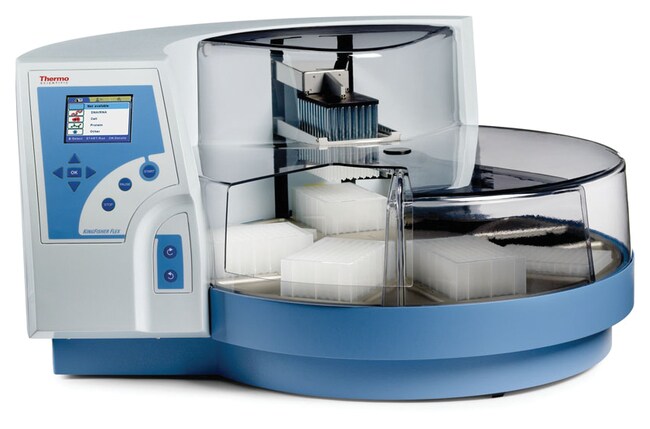
KingFisher™ Flex Purification System
Actual product may vary
Thermo Scientific™

KingFisher™ Flex Purification System

Thermo Scientific™ KingFisher™ Flex Purification System을 사용하여 여러 물질로부터 시료를 효율적으로 준비하십시오.
Have Questions?
보기 방식 변경buttonViewtableView
카탈로그 번호제품 유형
540062096 PCR Plate
2407441096 PCR Head
2407441196 PCR head and heating block
2407443196 DW head and heating block
2407442096 DW Head
2407442196 KF head and heating block
2407444124 PCR head and heating block
A3995296 Plate and Warranty
A3996696 Plate with SmartStart
카탈로그 번호 5400620
제품 가격(KRW)
-
견적 요청하기
제품 유형:
96 PCR Plate
거의 모든 원료의 DNA/RNA, 단백질 또는 셀 정제를 위해 매우 다양하고 자동화된 자석 입자 처리 기능을 제공하는 Thermo Scientific™ KingFisher™ Flex Purification System을 사용하여 여러 물질로부터 시료를 효율적으로 준비하십시오. 혁신적인 자석 입자 분리 기술을 이용한 이 시스템은 재현성과 품질이 우수합니다.
시료 처리의 요구의 유형에 따른 유연한 해결책을 찾아줍니다. 24개의 자석 헤드로 사용자는 처리 부피를 5mL까지 증가시킬 수 있어 분리되는 물질의 정제율도 증가시킬 수 있습니다. 처리량이 더 많이 요구되는 경우, 96개의 시료를 96개의 자석 헤드로 처리할 수 있습니다.
  • 완벽하게 자동 시스템으로 작동되어 핵산과 단백질 및 셀을 빠른 속도로 정제할 수 있습니다.
  • 높은 처리량 시스템으로 96개의 시료를 20분 내에 처리할 수 있습니다.
  • 유연한 개방형 시스템으로 사용자는 요구되는 적용 목적을 충족할 수 있는 모든 자석 입자 기반 키트를 사용할 수 있습니다.
  • 사용이 편리한 Thermo Scientific™ BindIt™ Software는 기기 제어, 프로토콜 생성 및 수정 기능을 제공합니다.
  • 다양한 용도에 따라 미리 제작된 프로토콜이 준비되어 있습니다.

권장 용도:

  • 유전체 및 단백체
  • 타겟 식별
  • 수의학 분석
  • 생물지표 탐색
  • 품질 관리
  • 법의학 분야

For Laboratory Use
사양
Collection Efficiency of Particles> 95%
깊이(영국식 단위)23.6 in.
깊이(미터법)60 cm
디스플레이START / PAUSE / STOP / OK / TURNTABLE ROTATING CLOCKWISE / TURNTABLE ROTATING COUNTERCLOCKWISE / four cursor keys / LCD
용도(애플리케이션)Genomics and proteomics, target identification, veterinary assays, biomarker discovery, quality control, forensics
가열 온도From +5°C above ambient temperature to +115°C
높이(영국식 단위)15 in.
높이(미터법)38 cm
자기봉96 in one frame; Interchangeable magnet heads
입자 크기(미터법)ca. >1 μm
플레이트 유형24 or 96-well plates: KingFisher 24 Deep Well plate (200 to 5000 μL), Microtiter 96 Deep Well plate (50 to 1000 μL), KingFisher 96 plate (20 to 200 μL), PCR plate (20 to 100 μL)
중량(영국식 단위)62 lb.
중량(미터법)28 kg
폭(영국식 단위)26.8 in.
폭(미터법)68 cm
용량96 Samples
형식96-well Plate
데크 당 플레이트24 or 96
제품 유형96 PCR Plate
부피(미터법) 프로세싱20 to 200 μL
Unit SizeEach

자주 묻는 질문(FAQ)

Where can I find the manual for the BindIt Software?

The User Manual for the BindIt Software can be downloaded from the BindIt Software product page online, under the Documents & Downloads section. It is also included within the BindIt Software installation file under "Documentation".

Find additional tips, troubleshooting help, and resources within our Automated Nucleic Acid Purification Support Center.

I cannot connect my KingFisher Flex instrument to the BindIt software. How do I troubleshoot this issue?

To determine the cause of the connection issue, we recommend checking the following:
1. Check software settings:
• Make sure the instrument selected is KingFisher Flex.
• Make sure the instrument serial number was input with the dash included and no spaces (ex, "711-xxxx").
• Make sure the communication tab was set to "USB" and not "COM".
2. Check the instrument and computer:
• The KingFisher Flex instrument screen (GUI) should be set to the "Factory Protocols" tab (blue tab) for best results.
• Make sure the port function on the Maintenance Tab (last tab) is checked for "USB".
• Try using different USB cables.
• Try a different USB port on the computer.
• Check the Windows version you are using.
• Reboot the KingFisher Flex instrument and the computer.
• Make sure the driver was installed properly. This may require the help of your local IT team.

If the connection issue persists, please contact our Technical Support team at techsupport@thermofisher.com.

Find additional tips, troubleshooting help, and resources within our Automated Nucleic Acid Purification Support Center.

What Uninterruptible Power Supply (UPS) do you recommend I use with the KingFisher Flex instrument?

You can use any brand of UPS as long as it is compatible with the following KingFisher Flex instrument electrical specifications:
• Mains power supply: 100–240 Vac, 50/60 Hz, nominal automatic voltage detection
• Power consumption: 175 VA max.; 55 VA standby

Find additional tips, troubleshooting help, and resources within our Automated Nucleic Acid Purification Support Center.

I am getting the following error message on the KingFisher Flex instrument: error message 12. What can I do to fix this error?

The “error message 12” error usually means there is something out of place on the KingFisher Flex instrument. We recommend the following to resolve the issue:
1. Check the heat block and make sure that it is not lifted up out of the base of the unit. If it is out of the base, check to see if there is anything underneath it that is preventing it from going down. If there is nothing under the heat block, it may have gotten stuck in the up position. This will require a service call.
2. Check that the tip shield is off to the right and out of the way from underneath the magnetic head. If it is stuck in the incorrect position, this may require a service call.
3. If the turntable was moved and it clicked out of place, the rectangular footprint cannot be centered below the head. Turn off the instrument and turn it back on. The instrument should re-align itself.

If the error continues to display, please contact techsupport@thermofisher.com for assistance.

Find additional tips, troubleshooting help, and resources within our Automated Nucleic Acid Purification Support Center.

How do I use BindIt software 4.0 to load a script from my computer to the KingFisher Flex or KingFisher Duo/Duo Prime instrument?

Please follow these steps to load a script from your computer to the KingFisher Flex or KingFisher Duo/Duo Prime instrument:
1. Use the USB cable to connect the PC to the instrument.
2. Turn on the instrument.
3. Open the BindIt software and click the Connect button.
4. Select "Find New Instrument." BindIt will automatically connect to the instrument and the instrument screen will say "Computer Control".
5. Click the "Transfer" Button.
6. Click the "Upload" button.
7. Browse to find the file and double-click it.
8. In the new window that opens:
a. KingFisher Flex: you will be prompted to enter a new name – this is not necessary if the name only contains letters, digits, dash or underscore.
• If the name contains spaces, apostrophes or any other character, you should enter a new name containing only letters, digits, dash (-) or underscore (_).
• Click the "Category" pulldown to select the instrument folder you want to load the script to.
• Click OK.
b. KingFisher Duo/Duo Prime: The KingFisher Duo and Duo Prime instruments accept all characters in the filename.
• Click the "Category" pulldown to select the instrument folder you want to load the script to.
• Click OK.

Find additional tips, troubleshooting help, and resources within our Automated Nucleic Acid Purification Support Center.