Search


Citations & References (15)
EVOS™ FL Color Imaging System
Catalog number AMEFC4300
Price (USD)
-
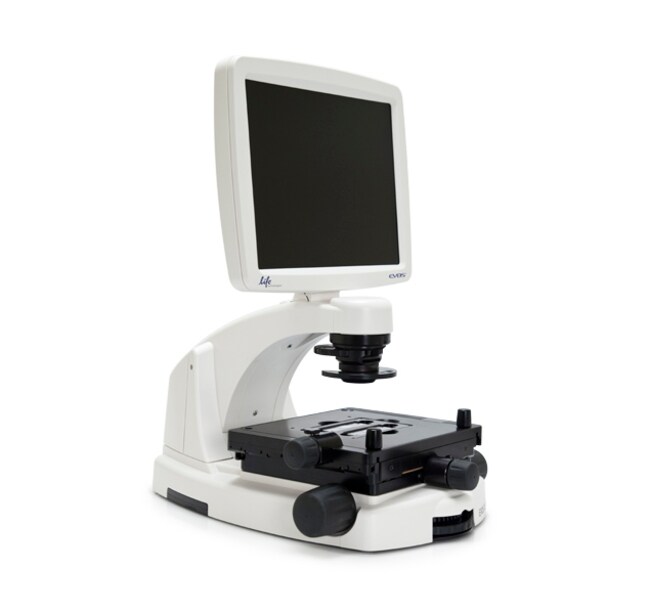
The EVOS® FL Color Imaging System is a fully-integrated, digital, inverted imaging system for four-color fluorescence and transmitted-light applications. It is powerful, yet easy to use and delivers high-definition images with exceptional convenience. The patented light cubes, color camera, and precision-engineered optical system make the EVOS® FL Color system ideal for both demanding and routine imaging of fluorescent and colorimetrically stained samples.
The EVOS® FL Color Imaging System offers you these important advantages:
• Easy installation; no maintenance, assembly, alignment, or calibration
• For four-color fluorescence and transmitted-light applications
• Five-position objective turret with front controls
• On-board software
• All-in-one design: digital camera, precision optics, LCD display, and USB storage
Fully Integrated Imaging System
The EVOS® FL Color system represents a new concept in transmitted light inverted microscopy. It is a fully integrated imaging system that combines precision optics, a 15" high-resolution LCD display, and a sensitive color camera. Images are seamlessly acquired through the intuitive user interface using a mouse for easy control, and the integrated LED/camera allows easy control to reduce photo bleaching. Color cameras have lower fluorescence sensitivity than the monochrome cameras typically used for high-performance fluorescence imaging, like that found on the EVOS® FL system, but have the advantage of being able to differentiate structures by color in transmitted light (e.g., imaging stained tissue samples).
Versatile and Highly Configurable
The EVOS® FL Color system features an easily accessible 5-position objective turret and a 3-position condenser turret. The 4 fluorescence light cubes are lever-actioned for rapid and easy selection. The optical system can be configured to best meet your needs using our full range of high-quality objectives from 2x to 100x magnification. Lighting settings are automatically adjusted to match the objective magnification. The EVOS® FL Color system features a mechanical stage with X/Y-axis fine-positioning using control knobs conveniently located on the left side and the front of the stage. The stage accommodates EVOS® vessel holders that provide a perfect fit for most vessel types and sizes. Interchangeable stage plates accommodate most vessel types and sizes, including flasks, Petri dishes, multi-well plates, and slides.
Smart LED Illumination Technology
All EVOS® fluorescence imaging systems utilize our unique, proprietary LED light cubes. This world-leading light engine outputs remarkable intensity over a short light-path that delivers superior fluorophore excitation. Each light cube contains a precisely matched set of optical components to optimize the position, evenness, and intensity of the light beam. Digitally controlled LED light sources allow adjustment of illumination levels, dramatically improving control over photobleaching. Hard-coated filters give sharper edges and significantly higher transmission efficiencies than traditional soft-coated filters.
Integrated Software
The on-board computer makes the EVOS® FL Color system easy to run and use, and the intuitive, comprehensive software facilitates both image acquisition and analysis. Modules include time-lapse acquisition, manual-assist cell counting, and image review. Saved user settings work in conjunction with "smart" controls to help increase efficiency and ease of use. Image data are saved to a USB flash drive
The EVOS® FL Color Imaging System offers you these important advantages:
• Easy installation; no maintenance, assembly, alignment, or calibration
• For four-color fluorescence and transmitted-light applications
• Five-position objective turret with front controls
• On-board software
• All-in-one design: digital camera, precision optics, LCD display, and USB storage
Fully Integrated Imaging System
The EVOS® FL Color system represents a new concept in transmitted light inverted microscopy. It is a fully integrated imaging system that combines precision optics, a 15" high-resolution LCD display, and a sensitive color camera. Images are seamlessly acquired through the intuitive user interface using a mouse for easy control, and the integrated LED/camera allows easy control to reduce photo bleaching. Color cameras have lower fluorescence sensitivity than the monochrome cameras typically used for high-performance fluorescence imaging, like that found on the EVOS® FL system, but have the advantage of being able to differentiate structures by color in transmitted light (e.g., imaging stained tissue samples).
Versatile and Highly Configurable
The EVOS® FL Color system features an easily accessible 5-position objective turret and a 3-position condenser turret. The 4 fluorescence light cubes are lever-actioned for rapid and easy selection. The optical system can be configured to best meet your needs using our full range of high-quality objectives from 2x to 100x magnification. Lighting settings are automatically adjusted to match the objective magnification. The EVOS® FL Color system features a mechanical stage with X/Y-axis fine-positioning using control knobs conveniently located on the left side and the front of the stage. The stage accommodates EVOS® vessel holders that provide a perfect fit for most vessel types and sizes. Interchangeable stage plates accommodate most vessel types and sizes, including flasks, Petri dishes, multi-well plates, and slides.
Smart LED Illumination Technology
All EVOS® fluorescence imaging systems utilize our unique, proprietary LED light cubes. This world-leading light engine outputs remarkable intensity over a short light-path that delivers superior fluorophore excitation. Each light cube contains a precisely matched set of optical components to optimize the position, evenness, and intensity of the light beam. Digitally controlled LED light sources allow adjustment of illumination levels, dramatically improving control over photobleaching. Hard-coated filters give sharper edges and significantly higher transmission efficiencies than traditional soft-coated filters.
Integrated Software
The on-board computer makes the EVOS® FL Color system easy to run and use, and the intuitive, comprehensive software facilitates both image acquisition and analysis. Modules include time-lapse acquisition, manual-assist cell counting, and image review. Saved user settings work in conjunction with "smart" controls to help increase efficiency and ease of use. Image data are saved to a USB flash drive
For Research Use Only. Not for use in diagnostic procedures.
Specifications
Unit Size1 each
Contents & Storage
Unit includes:
EVOS® FL Color Imaging System
Power adapter*
Universal stage plate
USB optical mouse
Dust cover
USB flash drive (includes User Guide and Quick Start Guide)
Diffusion Condenser Slider
Condenser Slider Block
UV shield/light shield
Light cube access door
Stage lock pin (in place on stage)
*Note that a country-specific power cord must be ordered separately.
EVOS® FL Color Imaging System
Power adapter*
Universal stage plate
USB optical mouse
Dust cover
USB flash drive (includes User Guide and Quick Start Guide)
Diffusion Condenser Slider
Condenser Slider Block
UV shield/light shield
Light cube access door
Stage lock pin (in place on stage)
*Note that a country-specific power cord must be ordered separately.
Frequently asked questions (FAQs)
Images captured with our EVOS FL Cell Imaging System are dimmer than when the sample is viewed live through the camera. Would you suggest any fixes for this problem?
I'm trying to acquire an image on the EVOS imaging system, but nothing shows up on the monitor. What can be causing this?
I'm using an EVOS imaging system and my objective is rubbing up against the edge of the vessel holder of my stage. How can I correct this?
I want to check to make sure I have the most up-to-date software for my EVOS imaging system. Where do I go for this?
Can the EVOS cell imaging systems be used to automatically count cells?
Citations & References (15)
Citations & References
Abstract
Heparan sulfate facilitates Rift Valley fever virus entry into the cell.
Journal:J Virol
PubMed ID:23015725
Rift Valley fever virus (RVFV), an emerging arthropod-borne pathogen, has a broad host and cell tropism. Here we report that the glycosaminoglycan heparan sulfate, abundantly present on the surface of most animal cells, is required for efficient entry of RVFV. Entry was significantly reduced by preincubating the virus inoculum with
Neuroprotective effects of transcription factor Brn3b in an ocular hypertension rat model of glaucoma.
Journal:
PubMed ID:25587060
'Purpose: Glaucoma is an optic neuropathy commonly associated with elevated intraocular pressure (IOP), leading to optic nerve head (ONH) cupping, axon loss and apoptosis of retinal ganglion cells (RGCs) which could ultimately result in blindness. Brn3b is a class-4 POU domain transcription factor that plays a key role in RGC
Neuronal deletion of caspase 8 protects against brain injury in mouse models of controlled cortical impact and kainic acid-induced excitotoxicity.
Journal:PLoS One
PubMed ID:21957448
'Acute brain injury is an important health problem. Given the critical position of caspase 8 at the crossroads of cell death pathways, we generated a new viable mouse line (Ncasp8(-/-)), in which the gene encoding caspase 8 was selectively deleted in neurons by cre-lox system. Caspase 8 deletion reduced rates
PARK9-associated ATP13A2 localizes to intracellular acidic vesicles and regulates cation homeostasis and neuronal integrity.
Journal:Hum Mol Genet
PubMed ID:22186024
'Mutations in the ATP13A2 gene (PARK9, OMIM 610513) cause autosomal recessive, juvenile-onset Kufor-Rakeb syndrome and early-onset parkinsonism. ATP13A2 is an uncharacterized protein belonging to the P(5)-type ATPase subfamily that is predicted to regulate the membrane transport of cations. The physiological function of ATP13A2 in the mammalian brain is poorly understood.
Cofilin nuclear-cytoplasmic shuttling affects cofilin-actin rod formation during stress.
Journal:J Cell Sci
PubMed ID:22623727
'Cofilin protein is involved in regulating the actin cytoskeleton during typical steady state conditions, as well as during cell stress conditions where cofilin saturates F-actin, forming cofilin-actin rods. Cofilin can enter the nucleus through an active nuclear localization signal (NLS), accumulating in nuclear actin rods during stress. Here, we characterize