Search


Thermo Scientific™
Watson™ LIMS™ Software
Manage bioanalytical studies and ease compliance using industry-standard LIMS software for bioanalysis, designed and built to support specific industry requirements.
| Número do catálogo | Type |
|---|---|
| INF-21000 | Watson LIMS Software |
Número do catálogo INF-21000
Preço (BRL)
-
Type:
Watson LIMS Software
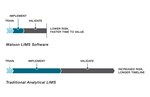
Manage bioanalysis studies from project initiation through study closeout with an industry leading bioanalysis solution, Thermo Scientific™ Watson™ LIMS Software. Watson™ LIMS Software was designed with a deep understanding of small and large molecule bioanalytical workflows. The software helps to enable compliance with industry regulations such as 21 CFR Part 58 for small and large molecule bioanalysis. Study coordinators, scientists, and technical staff are all able to move logically through each step in their process, simplifying bioanalytical support for nonclinical and clinical studies.
Thermo Scientific™ Watson™ LIMS Software is specifically designed and built to support the bioanalytical workflow, allowing users to:
- Manage both small and large molecule bioanalysis workflows in a single solution
- Harmonize laboratory processes across all sites
- Ease exchange of information between sponsors and contract labs
- Increase throughput by automating data handling and reporting tasks
- Promote compliance with standards such as 21 CFR Part 58 throughout the workflow
- Implement quantitative concentration assays or qualitative immunogenicity assays
- Track study sample history from receipt to disposal
- Comply with SOPs and reduce the risk of non-compliance
With the latest version 7.7.2, Watson™ LIMS evolves—delivering stronger security, faster validation, and a foundation for the Next-Gen LIMS era. Watson™ LIMS provides enhanced functionality when used with optional Red Thread® modules—Red Thread Fit™ for regression curve fitting, Red Thread Verge™ for ADA cut-point analysis, and Red Thread Eval™ (coming soon) for study output validation—delivering an advanced, audit-ready analytics experience.
From global pharma to agile biotech and CROs, Watson™ LIMS empowers scientists to work with confidence, accelerate decisions, and drive productivity—today and into the future.
Key features of Watson™ LIMS 7.7.2:
- Security & stability: Encryption, single sign-on via Thermofisher.com for robust, reliable performance.
- Compliance & audit trail: Enhanced traceability and regulatory alignment (GLP, 21 CFR Part 11).
- Advanced analytics: Watson™ LIMS version 7.7.2 works with Red Thread® modules — Red Thread Fit™, Red Thread Verge™, and Red Thread Eval™ (coming soon)— unlock regression accuracy, defensible ADA cut points, and automated validation.
- Future-ready: Foundation for modular, SaaS-based Next-Gen LIMS capabilities.
Learn more about version 7.7.2
Especificações
TypeWatson LIMS Software
Unit SizeEach