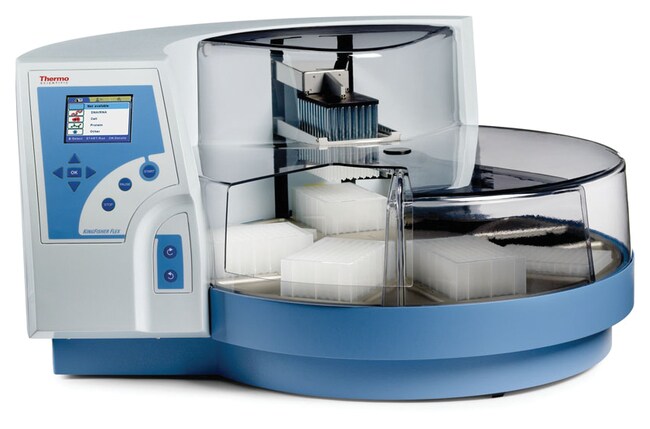
KingFisher™ Flex Purification System
Thermo Scientific™

KingFisher™ Flex Purification System

Préparez efficacement vos échantillons à partir de divers matériaux grâce aux systèmes de purification Thermo Scientific™ KingFisher™ Flex.
Have Questions?
Modifier l'affichagebuttonViewtableView
RéférenceType de produit
A39966Plaque 96 puits avec SmartStart
24074410Tête 96 PCR
24074411Tête PCR 96 puits et bloc chauffant
24074431Tête à 96 puits profonds et bloc chauffant
2407442096 Standard Head
24074421Tête KF et bloc de chauffage 96
24074441Tête PCR 24 puits et bloc chauffant
24075410Bloc chauffant 96 PCR
5400620Plaque PCR 96
A3995296 Plaque et garantie
Référence A39966
Prix (EUR)
-
Type de produit:
Plaque 96 puits avec SmartStart
Préparez efficacement vos échantillons à partir de divers matériaux grâce au système de purification Thermo Scientific™ KingFisher™ Flex qui permet un traitement des particules magnétiques automatique et très polyvalent pour l’ADN/ARN, les protéines ou la purification des cellules à partir de pratiquement toutes les sources. Ce système, qui utilise une technologie révolutionnaire de séparation des particules magnétiques, permet une excellente reproductibilité et offre une excellente qualité.

Solution souple pour différents types de besoins de traitements d’échantillons. Avec 24 configurations, les clients peuvent monter le volume de traitement jusqu’à 5 ml, ce qui augmente le rendement de produit purifié. Pour les besoins de rendement plus élevés, 96 échantillons peuvent être traités avec une tête magnétique 96 puits.

  • Ce système entièrement automatisé offre une purification à grande vitesse des acides nucléiques, des protéines et des cellules.
  • Système à rendement élevé, il traite jusqu’à 96 échantillons en moins de 20 minutes.
  • Le format 24 puits permet de multiplier le volume de l’échantillon par 10.
  • Un système ouvert et souple qui permet au client d’utiliser tous les kits à base de particules magnétiques pour satisfaire les exigences des applications.
  • Le logiciel facile à utiliser Thermo Scientific™ BindIt™ permet de contrôler l’instrument, de créer et de modifier les protocoles.
  • Des protocoles prêts à l’emploi pour différents types d’applications sont disponibles.

Recommandées dans les cas suivants :

  • Génomique et protéomique
  • Identification de la cible
  • Dosages vétérinaires
  • Découverte des biomarqueurs
  • Contrôle qualité
  • Médecine légale
Pour un usage en laboratoire
Spécifications
Collection Efficiency of Particles>95 %
Customer Education1 jour sur le site du client
Profondeur (impériale)23,6 in
Profondeur (métrique)60 cm
AffichageDÉMARRAGE / PAUSE / ARRÊT / OK / PLATEAU PIVOTANT DANS LE SENS HORAIRE / PLATEAU PIVOTANT DANS LE SENS ANTI-HORAIRE / Quatre touches de déplacement / LCD
À utiliser avec (application)Génomique et protéomique, identification cible, dosages vétérinaires, découverte des marqueurs biologiques, contrôle de la qualité, médecine légale
Température de chauffageDe +5°C au-dessus de la température ambiante jusqu’à +115°C
Hauteur (impériale)15 in
Hauteur (métrique)38 cm
Tiges magnétiques96 dans un cadre ; têtes aimantées permutables
Taille des particules (métrique)environ >1 μm
Type de microplaquesPlaques de 24 ou 96 puits ; plaque KingFisher à 24 puits profonds (200 à 5 000 μl) ; plaque de microtitration à 96 puits profonds (50 à 1 000 μl) ; plaque KingFisher à 96 puits (20 à 200 μl) ; plaque PCR (20 à 100 μl)
QuantitéSystem + SmartStart
Total Service CoverageGarantie fabricant de 1 an
Poids (impériale)62 lb
Poids (métrique)28 kg
Largeur (impériale)26,8 in
Largeur (métrique)68 cm
Capacité96 échantillons
FormatPlaque 96 puits
Plaques par plateau24 ou 96
Type de produitPlaque 96 puits avec SmartStart
Volume (métrique) de traitement20 à 200 μl
Unit SizeEach
Composants d’emballage
Système de purification Kingfisher™ Flex
Référence
5400620
Taille de l’unité
Each
Quantité
1
TRN00340
Référence
TRN00340
Taille de l’unité
Quantité
1

Foire aux questions (FAQ)

Where can I find the manual for the BindIt Software?

The User Manual for the BindIt Software can be downloaded from the BindIt Software product page online, under the Documents & Downloads section. It is also included within the BindIt Software installation file under "Documentation".

Find additional tips, troubleshooting help, and resources within our Automated Nucleic Acid Purification Support Center.

I cannot connect my KingFisher Flex instrument to the BindIt software. How do I troubleshoot this issue?

To determine the cause of the connection issue, we recommend checking the following:
1. Check software settings:
• Make sure the instrument selected is KingFisher Flex.
• Make sure the instrument serial number was input with the dash included and no spaces (ex, "711-xxxx").
• Make sure the communication tab was set to "USB" and not "COM".
2. Check the instrument and computer:
• The KingFisher Flex instrument screen (GUI) should be set to the "Factory Protocols" tab (blue tab) for best results.
• Make sure the port function on the Maintenance Tab (last tab) is checked for "USB".
• Try using different USB cables.
• Try a different USB port on the computer.
• Check the Windows version you are using.
• Reboot the KingFisher Flex instrument and the computer.
• Make sure the driver was installed properly. This may require the help of your local IT team.

If the connection issue persists, please contact our Technical Support team at techsupport@thermofisher.com.

Find additional tips, troubleshooting help, and resources within our Automated Nucleic Acid Purification Support Center.

What Uninterruptible Power Supply (UPS) do you recommend I use with the KingFisher Flex instrument?

You can use any brand of UPS as long as it is compatible with the following KingFisher Flex instrument electrical specifications:
• Mains power supply: 100–240 Vac, 50/60 Hz, nominal automatic voltage detection
• Power consumption: 175 VA max.; 55 VA standby

Find additional tips, troubleshooting help, and resources within our Automated Nucleic Acid Purification Support Center.

I am getting the following error message on the KingFisher Flex instrument: error message 12. What can I do to fix this error?

The “error message 12” error usually means there is something out of place on the KingFisher Flex instrument. We recommend the following to resolve the issue:
1. Check the heat block and make sure that it is not lifted up out of the base of the unit. If it is out of the base, check to see if there is anything underneath it that is preventing it from going down. If there is nothing under the heat block, it may have gotten stuck in the up position. This will require a service call.
2. Check that the tip shield is off to the right and out of the way from underneath the magnetic head. If it is stuck in the incorrect position, this may require a service call.
3. If the turntable was moved and it clicked out of place, the rectangular footprint cannot be centered below the head. Turn off the instrument and turn it back on. The instrument should re-align itself.

If the error continues to display, please contact techsupport@thermofisher.com for assistance.

Find additional tips, troubleshooting help, and resources within our Automated Nucleic Acid Purification Support Center.

How do I use BindIt software 4.0 to load a script from my computer to the KingFisher Flex or KingFisher Duo/Duo Prime instrument?

Please follow these steps to load a script from your computer to the KingFisher Flex or KingFisher Duo/Duo Prime instrument:
1. Use the USB cable to connect the PC to the instrument.
2. Turn on the instrument.
3. Open the BindIt software and click the Connect button.
4. Select "Find New Instrument." BindIt will automatically connect to the instrument and the instrument screen will say "Computer Control".
5. Click the "Transfer" Button.
6. Click the "Upload" button.
7. Browse to find the file and double-click it.
8. In the new window that opens:
a. KingFisher Flex: you will be prompted to enter a new name – this is not necessary if the name only contains letters, digits, dash or underscore.
• If the name contains spaces, apostrophes or any other character, you should enter a new name containing only letters, digits, dash (-) or underscore (_).
• Click the "Category" pulldown to select the instrument folder you want to load the script to.
• Click OK.
b. KingFisher Duo/Duo Prime: The KingFisher Duo and Duo Prime instruments accept all characters in the filename.
• Click the "Category" pulldown to select the instrument folder you want to load the script to.
• Click OK.

Find additional tips, troubleshooting help, and resources within our Automated Nucleic Acid Purification Support Center.