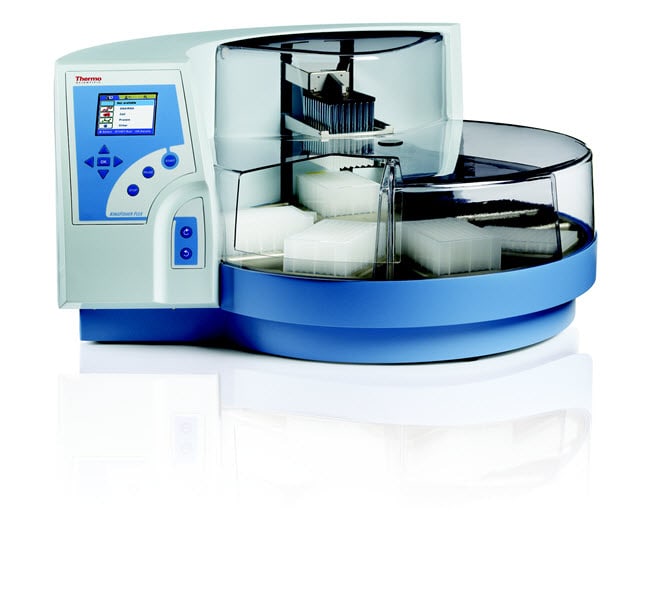
Sistema de purificación KingFisher™ Flex, KingFisher con cabezal para 24 pocillos profundos
Thermo Scientific™

Sistema de purificación KingFisher™ Flex, KingFisher con cabezal para 24 pocillos profundos

Prepare muestras de manera eficiente a partir de una gran variedad de materiales con los procesadores de partículas magnéticas Thermo Scientific™ KingFisher™ Flex.
Have Questions?
Número de catálogoCantidad
5400640Cada uno
Número de catálogo 5400640
Precio (MXN)
-
Cantidad:
Cada uno
Prepare muestras de manera eficaz de una gran variedad de materiales con el sistemas de purificación Thermo Scientific™ KingFisher™ Flex, que ofrece un procesamiento de partículas magnéticas automático y altamente versátil para la purificación de células, proteínas y ADN/ARN de prácticamente cualquier fuente. Gracias a la revolucionaria tecnología de separación de partículas magnéticas, este sistema proporciona una calidad y reproducibilidad excelentes.
Encuentre una solución flexible para diferentes tipos de necesidades de procesamiento de muestras. Con 24 cabezales magnéticos, los clientes pueden aumentar el volumen de procesamiento hasta 5 ml, lo que ofrece un resultado superior del producto purificado. Para necesidades de rendimiento más altas, es posible procesar 96 muestras con la cabeza de 96 imanes.
  • El sistema totalmente automatizado ofrece una purificación de ácidos nucleicos, proteínas y células de alta velocidad.
  • El sistema de alta capacidad procesa hasta 96 muestras en menos de 20 minutos.
  • Sistema abierto y flexible que permite al cliente utilizar cualquier kit basado en partículas magnéticas para satisfacer las exigencias de cada aplicación.
  • El software Thermo Scientific™ BindIt™ es fácil de usar y permite controlar el instrumento además de crear y modificar protocolos.
  • Protocolos preconfigurados para distintos tipos de aplicaciones.

Recomendada para:

  • Genómica y proteómica
  • Identificación de dianas
  • Ensayos veterinarios
  • Descubrimiento de biomarcadores
  • Control de calidad
  • Estudios forenses

Para uso en laboratorios
Especificaciones
Collection Efficiency of Particles> 95 %
Fondo (imperial)23,6 in
Fondo (métrico)60 cm
DescripciónPlaca de 24 pocillos profundos KingFisher
PantallaINICIO / PAUSA / PARAR / ACEPTAR / PLACA GIRATORIA GIRANDO A DERECHA/ PLACA GIRATORIA GIRANDO A IZQUIERDA/ cuatro teclas de cursor / LCD
Para utilizar con (aplicación)ensayos de genómica y proteómica, identificación de dianas, ensayos de veterinaria, descubrimiento de biomarcadores, control de calidad, estudios forenses
Temperatura de calentamientoDesde +5°C por encima de la temperatura ambiente hasta +115°C
Altura (imperial)15 in
Altura (métrico)38 cm
Varillas magnéticas24 en un soporte; cabezales magnéticos intercambiables
Tamaño de partículas (métrico)aprox. > 1 μm
Tipos de placasPlacas de 24 o 96 pocillos; placa de 24 pocillos profundos KingFisher (de 200 a 5000 µl); placa de 96 pocillos profundos de Microtiter (de 50 a 1000 µl); placa de 96 KingFisher (de 20 a 200 µl); placa de PCR (20 a 100 µl)
CantidadCada uno
Peso (imperial)62 lb
Peso (métrico)28kg
Anchura (imperial)26,8 in
Anchura (métrico)68 cm
Capacidad24 muestras
Placas por cubierta24 o 96
Volumen de procesamiento (métrico)De 200 to 5000 μl
Unit SizeEach

Preguntas frecuentes

Where can I find the manual for the BindIt Software?

The User Manual for the BindIt Software can be downloaded from the BindIt Software product page online, under the Documents & Downloads section. It is also included within the BindIt Software installation file under "Documentation".

Find additional tips, troubleshooting help, and resources within our Automated Nucleic Acid Purification Support Center.

I cannot connect my KingFisher Flex instrument to the BindIt software. How do I troubleshoot this issue?

To determine the cause of the connection issue, we recommend checking the following:
1. Check software settings:
• Make sure the instrument selected is KingFisher Flex.
• Make sure the instrument serial number was input with the dash included and no spaces (ex, "711-xxxx").
• Make sure the communication tab was set to "USB" and not "COM".
2. Check the instrument and computer:
• The KingFisher Flex instrument screen (GUI) should be set to the "Factory Protocols" tab (blue tab) for best results.
• Make sure the port function on the Maintenance Tab (last tab) is checked for "USB".
• Try using different USB cables.
• Try a different USB port on the computer.
• Check the Windows version you are using.
• Reboot the KingFisher Flex instrument and the computer.
• Make sure the driver was installed properly. This may require the help of your local IT team.

If the connection issue persists, please contact our Technical Support team at techsupport@thermofisher.com.

Find additional tips, troubleshooting help, and resources within our Automated Nucleic Acid Purification Support Center.

What Uninterruptible Power Supply (UPS) do you recommend I use with the KingFisher Flex instrument?

You can use any brand of UPS as long as it is compatible with the following KingFisher Flex instrument electrical specifications:
• Mains power supply: 100–240 Vac, 50/60 Hz, nominal automatic voltage detection
• Power consumption: 175 VA max.; 55 VA standby

Find additional tips, troubleshooting help, and resources within our Automated Nucleic Acid Purification Support Center.

I am getting the following error message on the KingFisher Flex instrument: error message 12. What can I do to fix this error?

The “error message 12” error usually means there is something out of place on the KingFisher Flex instrument. We recommend the following to resolve the issue:
1. Check the heat block and make sure that it is not lifted up out of the base of the unit. If it is out of the base, check to see if there is anything underneath it that is preventing it from going down. If there is nothing under the heat block, it may have gotten stuck in the up position. This will require a service call.
2. Check that the tip shield is off to the right and out of the way from underneath the magnetic head. If it is stuck in the incorrect position, this may require a service call.
3. If the turntable was moved and it clicked out of place, the rectangular footprint cannot be centered below the head. Turn off the instrument and turn it back on. The instrument should re-align itself.

If the error continues to display, please contact techsupport@thermofisher.com for assistance.

Find additional tips, troubleshooting help, and resources within our Automated Nucleic Acid Purification Support Center.

How do I use BindIt software 4.0 to load a script from my computer to the KingFisher Flex or KingFisher Duo/Duo Prime instrument?

Please follow these steps to load a script from your computer to the KingFisher Flex or KingFisher Duo/Duo Prime instrument:
1. Use the USB cable to connect the PC to the instrument.
2. Turn on the instrument.
3. Open the BindIt software and click the Connect button.
4. Select "Find New Instrument." BindIt will automatically connect to the instrument and the instrument screen will say "Computer Control".
5. Click the "Transfer" Button.
6. Click the "Upload" button.
7. Browse to find the file and double-click it.
8. In the new window that opens:
a. KingFisher Flex: you will be prompted to enter a new name – this is not necessary if the name only contains letters, digits, dash or underscore.
• If the name contains spaces, apostrophes or any other character, you should enter a new name containing only letters, digits, dash (-) or underscore (_).
• Click the "Category" pulldown to select the instrument folder you want to load the script to.
• Click OK.
b. KingFisher Duo/Duo Prime: The KingFisher Duo and Duo Prime instruments accept all characters in the filename.
• Click the "Category" pulldown to select the instrument folder you want to load the script to.
• Click OK.

Find additional tips, troubleshooting help, and resources within our Automated Nucleic Acid Purification Support Center.