 Handheld Raman analyzers are used around a variety of substances in diverse environments. Because they can help quickly identify unknown solid and liquid chemicals, including explosives, toxic industrial chemicals, chemical weapons, narcotics, precursors, and white powders, those substances can contaminate the instrument itself. First responders and the military use these instruments that utilize Raman spectroscopy, for rapid, precise identification of potentially hazardous materials so it is important the instrument is clean and free from contaminants before a scan is done.
Important Note: Before attempting to clean or decontaminate the instrument, please check with your manufacturer, authorized representative, or the instrument user manual for specific instructions. Instruments differ and may require specific cleaning instructions. However, here are the recommendations we give for the users of our handheld Raman analyzers.
Cleaning the Instrument
To remove nonhazardous contaminants from the outside of the instrument, the nose cone, the shield, and the probe cable, wipe them with a soft cloth moistened with water or isopropyl alcohol.
If the instrument is contaminated with potentially hazardous substances, follow the decontamination procedures described in the following section.
Decontaminating the Instrument
First, remember that when the access door is open, the environmental seal is broken, and the system is no longer water and dust-resistant. The access door is designed to securely seal the battery compartment, to protect it from contaminants. Second, remember to be sure to follow your organization’s decontamination guidelines.
You may immerse the instrument for up to 1 hour in either water or a solution of 1 part household bleach (5% sodium hypochlorite) and 10 parts water.
Do not immerse the instrument in any liquid when the access door is open.
You should remove the instrument boot before decontamination. Although the boot fits tightly, contaminants may enter along its edges.
Before decontaminating the instrument, be sure to:
- Press the Wake/Sleep key to put the instrument to sleep
- Close the battery compartment door and the access door, making sure that the access door gasket is fully seated and the door is locked in place
- Seal the RS-232 connection port (and all other ports) with its cover
If the instrument becomes unresponsive, reboot it by turning it off, then on again. If the instrument still fails to reboot, contact Customer Support.
Do not remove the system card unless instructed to do so by Customer Support. The system memory card resides in a slot at the back of the battery compartment. The card holds the instrument software, chemical library, user-added library items, and stored scans. The system memory card does not hold any user modifiable software or data.
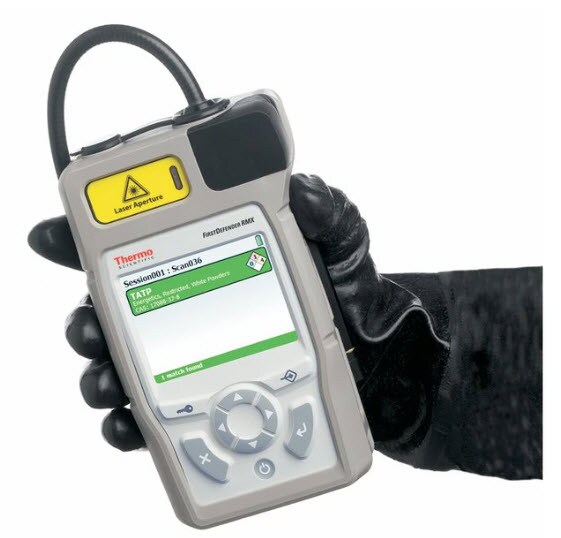 Note: These recommendations are for Thermo Scientific handheld Raman analyzers.

Key Insights on Article Addressing Raman Use in Hazardous Locations
Editor’s Note: We published an article on our related ... Marlene Gasdia-Cochrane, Editor
Read More
Was that Fireworks or an Explosion?
Last year, there was an estimated crowd of 250,000 people wh...
Read More
Audit Addresses Prevention of Controlled Substances (Drugs) from Entering Prisons
I was recently looking over a 2023 report from the Office of...
Read More
Take Advantage of FEMA Assistance to Firefighters Grant Program
Application Deadline: Mar. 8, 2024, at 5 p.m. ET. The FY 202...
Read More

Leave a Reply